Which AI tool should your organization choose?
Almost every organization is experimenting with AI by now. Someone has a ChatGPT subscription, IT is testing Copilot, and the marketing manager swears by something else. The result: a patchwork of tools, no policy, and confusion about what you can actually use with company data.
The question we hear from clients increasingly is not “is AI useful?” They know it is. The question is: which tool do we choose, why, and how do we make sure it happens responsibly?
This article does not rank “the best AI”. That does not exist. What we do: help you ask the right questions so you make a choice that fits how your organization works, what you already have in place, and what you do not want to risk.
First: four questions before you choose a tool
The tool is the last decision, not the first. What you need to know upfront:
1. What data are you using as input? Is it public information, internal documents, customer data, or production data from your ERP? The more sensitive the data, the more it matters which vendor processes it, and where.
2. What ecosystem are you already in? Do you use Microsoft 365, Google Workspace, or something else? AI works best when integrated into tools people already use daily. A standalone AI tool outside the existing ecosystem rarely sees structural adoption.
3. What is the use case: productivity or automation? Do you want to help people work faster (summarizing, writing, analyzing), or do you want to embed AI into processes and systems? This determines whether you need an interface product or an API integration.
4. Who is responsible for compliance? GDPR, NIS2, DORA, sector-specific regulations: AI tools process data, and that must be demonstrably secure. Who in your organization can sign off on that assessment?
With those four answers in mind, let us look at the tools.
Microsoft Copilot: for organizations already in the Microsoft ecosystem
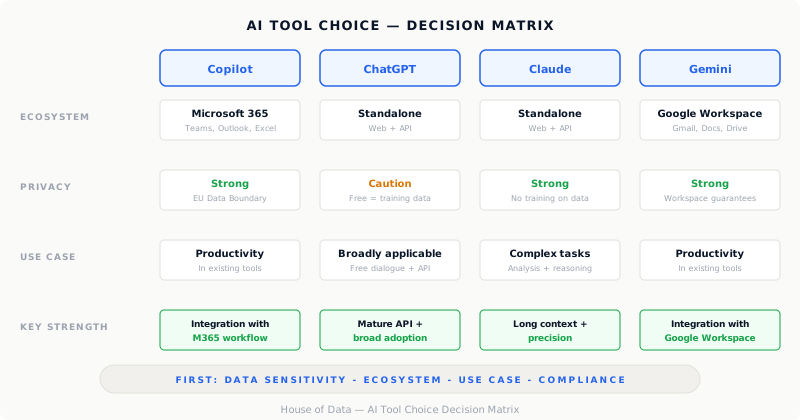
When it makes sense: Your organization uses Microsoft 365 (Teams, Outlook, Word, Excel, SharePoint). Copilot is directly integrated into that environment. That is its biggest advantage: people do not need to switch context. Summarizing meetings in Teams, drafting emails in Outlook, analyzing data in Excel. It works in the tool that is already open.
For organizations with an Azure data platform, Copilot also offers integration capabilities with internal data sources via Microsoft Fabric and Azure OpenAI Service. This makes it interesting if you want to go beyond productivity tools, toward AI that answers questions based on your own business data.
Privacy and data security: This is Microsoft’s strongest selling point for enterprise customers. Copilot for Microsoft 365 (the business license) does not use data for model training, offers EU Data Boundary options, and falls under the existing Microsoft data processing agreement that many organizations have already signed. For sectors with strict requirements (financial, healthcare, government) this is a real threshold-lowering factor.
Cost: Copilot for Microsoft 365 comes on top of an existing Microsoft 365 license. Expect tens of euros per user per month. You are paying for integration and the compliance layer, not just the model itself.
When it is less suitable: If you give people complex reasoning or writing tasks, or if you work outside the Microsoft ecosystem. The quality of the underlying model is good, but the interface is fragmented across applications and less suited for free, iterative dialogue.
ChatGPT (OpenAI): the most well-known, but not always the wisest choice for business data
When it works: ChatGPT is the most widely used AI interface in the world, and not without reason. The free dialogue feels intuitive, the quality of writing and reasoning is high, and for tasks without sensitive business data: market research, brainstorming, writing copy, explaining code; it is an excellent tool.
Privacy and data security: This is where the main caveat lies. The free and consumer version of ChatGPT uses conversations by default for model training. This is unacceptable for business use as soon as confidential information enters the conversation. ChatGPT Enterprise and API access offer better guarantees: no use for training, configurable retention periods, and a data processing agreement. But this requires a deliberate choice and purchase; the default settings are not suitable for business-sensitive data.
Integration: OpenAI offers an extensive API that lets you embed ChatGPT into your own applications, workflows and data pipelines. For organizations that want to automate AI, not just use it as an assistant: the OpenAI API is a mature choice with many capabilities.
Cost: Individual licenses are in the same range as Copilot. Enterprise is on request and significantly more expensive. The API is billed per token (text unit): cheap per use, but add it up across the entire organization and it can escalate quickly.
Claude (Anthropic): strong for complex, lengthy and sensitive tasks
When it makes sense: Claude stands out in situations where precision, caution and processing large amounts of text matter. Analyzing long contracts, writing technical documentation, thinking through complex issues step by step, or critically reviewing your own reasoning: Claude is built for that.
The context window (the amount of text Claude can process at once) is among the largest in the industry. In practice this means: you can input a complete report, an entire data model or multiple documents at once and ask questions about them.
Privacy and data security: Anthropic offers explicit guarantees via Claude.ai for Teams and Enterprise and via the API about not using business conversations for model training. The data processing agreement is available. For organizations in regulated sectors, Anthropic’s explicit focus on safe and reliable AI behavior is a factor that is taken seriously, including in procurement processes.
Integration: The Claude API is well documented and can be integrated into data pipelines, applications and internal tools. For organizations already working with Google Cloud or Azure, this is relatively straightforward to set up.
Cost: Comparable to ChatGPT for individual and team licenses. Enterprise on request. API usage is billed per token.
When it is less suitable: Claude has no direct integration with Microsoft 365 or Google Workspace. If the primary use case is productivity improvement in email and documents, Claude offers less out-of-the-box embedding than Copilot.
Gemini (Google): logical if you are in Google Workspace
When it makes sense: Just as Copilot is the choice for Microsoft organizations, Gemini is the logical choice for organizations running on Google Workspace: Gmail, Drive, Docs, Meet. The integration works similarly: summarizing, writing, analyzing within the tools already in use.
For organizations using Google Cloud as their data platform: BigQuery, Vertex AI, Gemini offers direct connections that simplify integration with data assets.
Privacy and data security: Gemini for Google Workspace (the business version) offers comparable guarantees to Microsoft: no use for training, data processing agreement available, configurable data storage.
Cost: Gemini for Workspace is included in higher Workspace subscriptions or available as an add-on. Comparable pricing to Copilot for similar enterprise functionality.
When it is less suitable: Outside the Google environment, Gemini is less dominant. If your organization runs on Microsoft, Gemini adds little value compared to Copilot, and running two parallel ecosystems is rarely a good idea.
The real differentiator: privacy and compliance
The models behind the four tools are now reasonably comparable in quality. The real differentiator lies in the conditions: who processes your data, where, under what terms, and can you demonstrate that to an auditor?
A rule of thumb we use with clients:
- Public or non-confidential information -> any tool works, choose based on usability.
- Internal documents without personal data -> business licenses from all four suffice, provided the data processing agreement is signed.
- Personal data, customer data, financial data -> business license required, verify the processing location (EU or not), document the choice in your processing register.
- Production data from ERP, data platform or source systems -> API integration with explicit data isolation. Not via a consumer interface.
The mistake we see most often: employees using a free ChatGPT account and pasting customer data or contracts into it. The tool works fine, the data is just no longer yours alone.
Cost: what you actually pay
License costs are just the beginning. Also consider:
- Implementation time: integration with existing systems takes time, even when the API is available.
- Management and policy: who manages the licenses, who sets the acceptable use guidelines, who monitors usage?
- Training: employees who know how to write good prompts get twice as much out of the same tool.
- Compliance work: data processing agreements, DPIAs, updating the processing register, that takes hours.
A license of tens of euros per user per month is not a small investment when you roll it out across fifty people. Make sure you know what you are getting in return.
How to make the choice?
No step-by-step plan, but honest advice: start small and deliberate.
Choose one use case that is concrete enough to measure: not “we are going to use AI”, but “we want our project managers to draft meeting notes faster.” Choose the tool that fits the ecosystem and the data sensitivity. Get the governance in order (license, data processing agreement, usage policy). Measure whether it works. Then expand.
The organizations that are furthest along in AI adoption are rarely the organizations with the most tools. They are the organizations that implemented one tool well and built out from there.
House of Data helps organizations make these kinds of choices, from the initial assessment to the technical integration with existing data infrastructure. Get in touch if you want to discuss AI adoption in your organization.