
Fabric Mirroring: how we removed Synapse from our BC365 pipeline
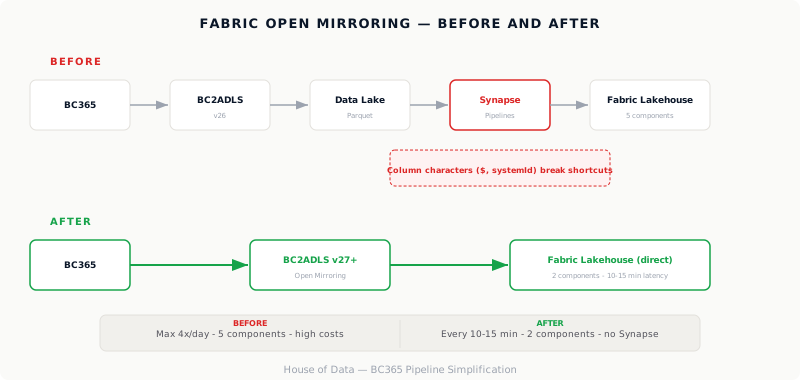
We manage the data platform for a manufacturing company on Azure. Data from Dynamics 365 Business Central feeds reports across multiple BI tools. Until recently, that data flow ran through a chain of BC2ADLS, Synapse pipelines and Spark clusters. It worked, but it was slow, expensive and fragile.
Last week, we replaced that entire chain with Fabric Open Mirroring. This is the story.
The old situation
The architecture was set up in the summer of 2025. Data flowed as follows:
Business Central -> BC2ADLS -> Data Lake (Parquet) -> Synapse pipelines -> Fabric Lakehouse
This worked for daily batch processing. But the business had two requirements this architecture couldn’t meet:
- Operational reports with data refreshed every few minutes
- Analytical reports showing data updated at least every 30 minutes
The problem was Synapse. Each pipeline run cost compute units, and at higher frequencies, costs spiralled. We scaled from Fabric F4 to F8, but that was fighting a losing battle.
Why we couldn’t simplify immediately
The obvious solution was Fabric Lakehouse shortcuts: a direct link from Data Lake Parquet files to Fabric, without Synapse in between. But that didn’t work.
The reason: column names in Business Central contain special characters. $Company, systemId-2000000000, standard in BC365 but fatal for Fabric Lakehouse shortcuts. Parquet files with these column names are simply not recognized.
We spent months working with workarounds: renaming columns, adding staging tables, keeping Synapse as a translation layer. It worked, but it was complex and costly.
The breakthrough: Open Mirroring
After analyzing the options, I reached out to one of the experts behind BC2ADLS. The conclusion was clear: the latest version of BC2ADLS supports Open Mirroring, which is now GA (Generally Available) in Fabric. By upgrading both Business Central and BC2ADLS, we could eliminate the entire Synapse layer.
I prepared an analysis of the improvement options and presented it to the client and all involved parties. The direction was clear:
Business Central -> BC2ADLS (v27+) -> Fabric Lakehouse (direct)
No Synapse. No Spark clusters. No staging tables. Data from BC365 is mirrored near-realtime to Fabric, with a latency of 10 to 15 minutes, without the complex pipeline we originally built.
The execution
The process from analysis to execution:
- Root cause analysis: identified the special characters in column names as the root cause of performance limitations
- Solution direction defined: Open Mirroring as an alternative to the Synapse pipeline, improvement options documented and presented
- Feasibility check with all involved vendors: can everyone deliver within the timeline?
- BC upgrade from version 26.5 to 27.0, including the latest BC2ADLS with Open Mirroring support
- Fabric reconfiguration: remove the Synapse intermediate step, set up direct mirroring
- Validation: do the reports still match with the new data flow?
The entire process from decision to start took two weeks. The technical execution on our end is expected to take a few days.
What this delivers
| Aspect | Old situation | With Open Mirroring |
|---|---|---|
| Architecture | BC -> ADLS -> Synapse -> Fabric | BC -> Fabric (direct) |
| Refresh frequency | Max 4x per day | Every 10-15 minutes |
| Moving parts | 5 components | 2 components |
| Synapse costs | Significant | Eliminated |
| Maintenance burden | High | Low |
The lesson
1. Watch the roadmap. Open Mirroring didn’t exist when we started. If it had, we would have designed the architecture differently from day one. Cloud platforms evolve fast; what requires a workaround today is a native feature tomorrow.
2. Invest in your network. The confirmation that Open Mirroring could solve our situation didn’t come from standard documentation, but from a targeted conversation with a specialist. One consultation saved us months of further developing a suboptimal architecture.
3. Dare to simplify. It’s tempting to build on what’s already there. We had invested weeks in Synapse optimizations, staging tables and column name workarounds. It took courage to let all of that go and start fresh with a simpler solution. But simpler is almost always better.
The best architecture isn’t the cleverest. It’s the simplest one that meets the requirements.