GCP as a foundation for healthcare analytics: architecture choices that matter
When a healthcare organization processes 43 million rows of data daily for analytical reporting, every architecture choice becomes a financial and operational decision. This is the story of how we built a healthcare analytics platform on Google Cloud, and what we learned along the way.
Why BigQuery as the foundation
The choice for BigQuery was straightforward. Three properties make it ideal for healthcare analytics:
Serverless. No clusters to manage, no capacity planning. Data in, queries on it, done. For an organization that needs to focus on care delivery (not infrastructure) that is essential.
Scalability without limits. The dataset grew from 8 million to 43 million rows in six months. BigQuery did not notice the difference. No re-indexing, no partition adjustments, no nightly maintenance jobs.
Direct Power BI integration. End users were already working in Power BI. Via the BigQuery ODBC connector, analysts could build their own reports without our involvement. That matters: a platform that creates dependency is not a good platform.
Cloud Run Jobs over Cloud Functions
For batch-processing ML models, we deliberately chose Cloud Run Jobs instead of Cloud Functions. The reason is simple: reliability for long-running tasks.
Cloud Functions have a maximum timeout of 9 minutes (2nd gen: 60 minutes). Our ML batch jobs sometimes run for 20-40 minutes, depending on data volume. Cloud Run Jobs support timeouts up to 24 hours and offer better control over memory and CPU allocation.
Additionally: Cloud Run Jobs run as containers. That means we can reproduce the exact same environment locally for debugging. With Cloud Functions, you are more dependent on logging and trial-and-error. In a healthcare context where you need to justify results, reproducibility is not a luxury.
Orchestration with GCP Workflows
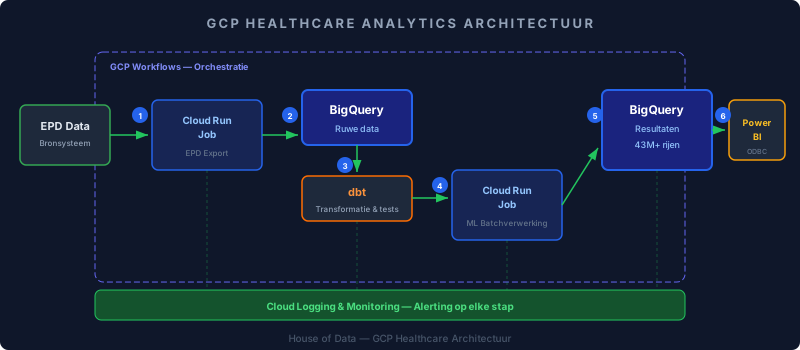
A pipeline is more than loose components. The EHR export must complete before dbt transforms. dbt must complete before the ML model runs. And the ML model must complete before Power BI refreshes.
GCP Workflows turned out to be exactly the right level of complexity for this. It is not Airflow: you do not need a DAG server, no scheduler to manage, no Python code to write for your orchestration. It is a YAML definition that executes steps sequentially or in parallel, with built-in retry logic and error handling.
A typical workflow in our setup:
- Cloud Run Job: export EHR data to BigQuery
- Wait for completion: Workflows polls the job status
- dbt run: execute transformations and tests
- Cloud Run Job: run ML model on transformed data
- Results written to BigQuery result tables
If step 3 fails, step 4 does not run. Sounds trivial, but without orchestration this is exactly where pipelines silently go wrong.
The ORDER BY lesson: costs you do not expect
A small anecdote. A BigQuery query feeding Power BI contained an ORDER BY clause on 43 million rows. In the test environment, it worked fine. But in production, combined with several views, the query ground to a halt. Too much compute, too much time.
The fix was simple: remove the ORDER BY. Power BI applies its own sorting when importing data. The sorting in BigQuery was redundant work.
The lesson: assumptions that are invisible in a test environment become problems in production. And optimization starts with the question: what work is actually necessary?
Monitoring: Cloud Logging as a safety net
With healthcare data, a silent failure is worse than a loud crash. If an EHR export fails and nobody notices, analysts work with stale data, without knowing it.
We implemented monitoring at three levels:
- Export validation: Cloud Run Jobs log the number of exported rows. A deviation of more than 10% compared to the previous run triggers an alert.
- dbt test failures: every dbt run includes data quality tests. Failures go directly to our monitoring channel.
- Workflow level: if a step in the Workflow fails, we receive a notification within 2 minutes via Cloud Logging + alerting policies.
The investment in monitoring paid for itself within two weeks. A change in the EHR source system caused a schema mismatch that we detected within an hour, instead of after three days when an analyst would have asked why the numbers did not add up.
Architecture choices as strategy
The choices we describe here (BigQuery, Cloud Run Jobs, GCP Workflows, Cloud Logging) are not technology preferences. They are answers to concrete questions: how do we scale without operational burden? How do we guarantee reliability for long-running tasks? How do we prevent silent failures?
For healthcare organizations looking to scale analytics on Google Cloud & Azure: start with orchestration and monitoring. The compute and storage will sort themselves out. The errors nobody sees will not.