
How to set up a Claude Project for your business
Many businesses use AI ad hoc by now: a question here, a prompt there. But the real value lies in structural use: an environment where the AI knows your business, maintains your tone, and can reference your documents without you having to explain who you are every time.
Claude Projects offers exactly that. You provide Claude with fixed instructions and upload relevant documents, so every session is immediately productive. But what exactly do you put in there? And what not?
This post gives a concrete answer, using B&G Catering as an example. It is applicable to any business that wants to use Claude structurally.
How a Claude Project works
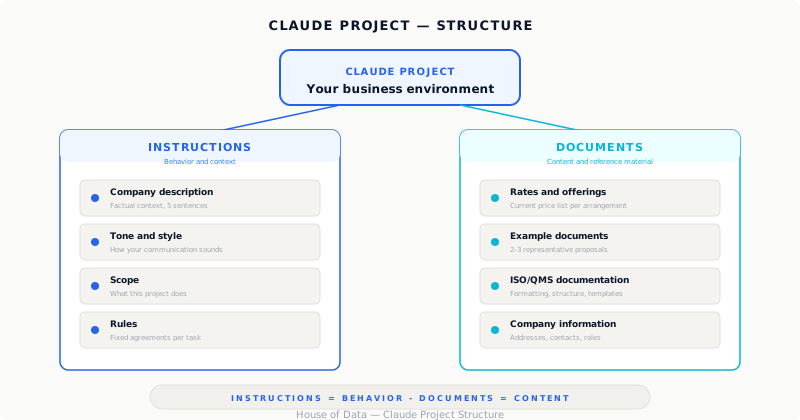
A project consists of two parts: instructions and documents.
The instructions are a fixed text that Claude uses as a starting point for every session. Think of it as a briefing you write once and never need to repeat. Here you set who you are, what the tone is, how Claude should reason and what the fixed rules are.
The documents are files you upload: price lists, packages, procedures, sample quotes. Claude can reference them during a conversation. You do not need to paste them every time.
The distinction matters: instructions are for behavior and context, documents are for content and reference material.
The instructions: what belongs in them
The instructions are the foundation. They do not need to be long (one page is more than enough), but they should be complete on four points.
1. Who is the company
Not a marketing text, but the factual context Claude needs to work well.
For B&G this would look like:
B&G Catering is a catering company and party service based in Harskamp, the Netherlands. The company is part of B&G Food Group BV, alongside Slagerij ‘t Pleintje (a butcher shop). The company has approximately 30 employees (permanent, on-call and temporary) and serves both private clients (weddings, anniversaries, receptions) and business clients (corporate events, company restaurants, open days). B&G works with local products and its own butcher shop, this is a key differentiator in client communication.
Short, factual, usable.
2. Tone and style
Claude adapts its writing style based on instructions. Be explicit about how the company’s communication sounds.
Communication is warm, personal and direct. Not formal business language, but not casual slang either. Clients are addressed formally. Quotes and letters are friendly but professional. Avoid jargon and keep sentences short.
If there are different types of communication (client emails versus internal instructions for drivers, for example), name that distinction explicitly.
3. What Claude does and does not do in this project
This sounds excessive, but it prevents confusion. If this project is set up for quotes and ISO documents, say so. Claude will still be able to help with other tasks, but the primary focus is clear.
This project is used for three purposes: (1) writing draft quotes for catering inquiries, (2) creating instructions and briefings for drivers and event teams, and (3) developing documentation for the ISO 9001 implementation. Claude always bases its output on the documents in this project. If information is missing, Claude asks rather than making something up.
That last sentence is important. It prevents Claude from inventing a rate or package that does not exist.
4. Fixed rules
Small practical agreements that come up every time. For B&G these include:
- Quotes always contain an opening sentence that connects to the client’s specific event, not a generic opening.
- Prices are never rounded or estimated: always use the rates from the price list in this project.
- ISO documents follow the fixed format: document title, version number, date, author, and a version history table at the end.
- Driver instructions are always numbered per stop, including special notes and contact number per location when available.
The documents: what you upload
The documents are the project’s knowledge base. Claude actively searches them during a conversation. What you upload depends on what you use the project for, but for B&G there are four categories that deliver immediate value.
Category 1: Product range and rates
This is the most-used reference for quotes. Upload an overview of all packages, products and corresponding rates. Keep it current: an outdated price list in the project leads to quotes with wrong amounts.
What to upload:
- Current rates per package (buffet, BBQ, gourmet, drinks reception, lunch)
- Overview of available options per category: Any minimum orders or volume pricing
- Delivery costs or surcharges for locations beyond a certain radius
Format: a clear Word or PDF document. Claude reads both.
Category 2: Sample quotes
Upload two or three quotes that were well received and representative of how the company communicates. Claude uses them as a style reference, not to copy, but to learn the tone, structure and level of detail.
Choose variety: a small private quote, a larger corporate quote, and preferably one for a specific event type like a wedding. Anonymize client details if you prefer.
Category 3: ISO 9001 documentation
For the ISO process, it is useful to have the already completed documents in the project. Claude can then match the format, terminology and structure of earlier documents when writing a new one.
What to upload:
- The completed QMS documents (context, quality policy, scope, roles, risk management)
- The formatting guidelines: font, heading structure, what a version history table looks like
- A blank template if available
When Claude writes a new document (say a process description for the quotation procedure), it can deliver it directly in the right style and structure without you having to instruct that every time.
Category 4: Practical business information
These are documents that are not directly for clients, but that Claude needs to handle internal tasks well.
Think of:
- A list of regular delivery addresses for business clients (company name, address, contact person, specifics like loading times or access rules)
- An overview of employees and roles, not for privacy-sensitive use, but so Claude knows who holds which function and instructions contain the right names
- A list of regular suppliers or partners if relevant for internal communication
What not to put in
Just as important as what you do upload.
No sensitive personal data of clients. Quote history with names, addresses and order amounts of individual clients does not belong in an AI project. The same goes for payment information or complaint files. Use Claude for the process, not as a storage location for client data.
No outdated information. A price list from last year, an old package that no longer exists, an employee who no longer works there: make sure what is in the project is accurate. Outdated context leads to output you always need to correct, and that undermines trust in the tool.
No unnecessary documents. More is not better. A project with twenty documents of which Claude never needs fifteen does not make it better. Start with the four essential categories above and only add what you actually find missing in practice.
A practical starting point
If you want to set up a project tomorrow, this is the minimum starting set:
Instructions (write this yourself, one page):: Company description in five sentences: Tone and style guidelines
- What this project is for: Four or five fixed rules
Documents (upload these files):: Current rates and product list: Two sample documents as style reference
- One completed quality document as format example: List of regular contacts and addresses
That is enough to be immediately productive. You can always expand the project when you notice Claude is missing information you keep having to provide again, that is the signal something needs to be added.
What it delivers
It sounds like upfront work. It is, but it is one-time work. Once the project is set up, every session works immediately. No explaining, no repetition, no output that has the wrong tone or contains data you do not recognize.
For B&G this means concretely: the office manager opens the project, types “wedding 180 guests, June 14, buffet and BBQ, client also wants drinks, venue in Ede”, and gets a draft quote that feels like B&G. The head chef opens the project, enters the event schedule, and gets a clear briefing for his team. The quality manager describes a process, and gets a ready-made process description in the right format.
The tool already works. The project makes it structural.
Want to know how to set up a Claude Project for your own organization? House of Data helps with the setup, the instructions and the connection to your existing processes.